Generate
Test Program Generation
From spec to a checked IG-XL project. Pick a spec and ATE·IQ writes the sheets, the VBT code and the digital patterns, with every test keyed to its requirement's test number. It checks the code, the tester setup and the limits, replays the tests against a model of the device — derived from your register map, or one you connect — and lists any it cannot judge. It repairs what the checks find and hands you a project to load in IG-XL, refine with the IG-XL agent and run on IG-XL's offline simulator.
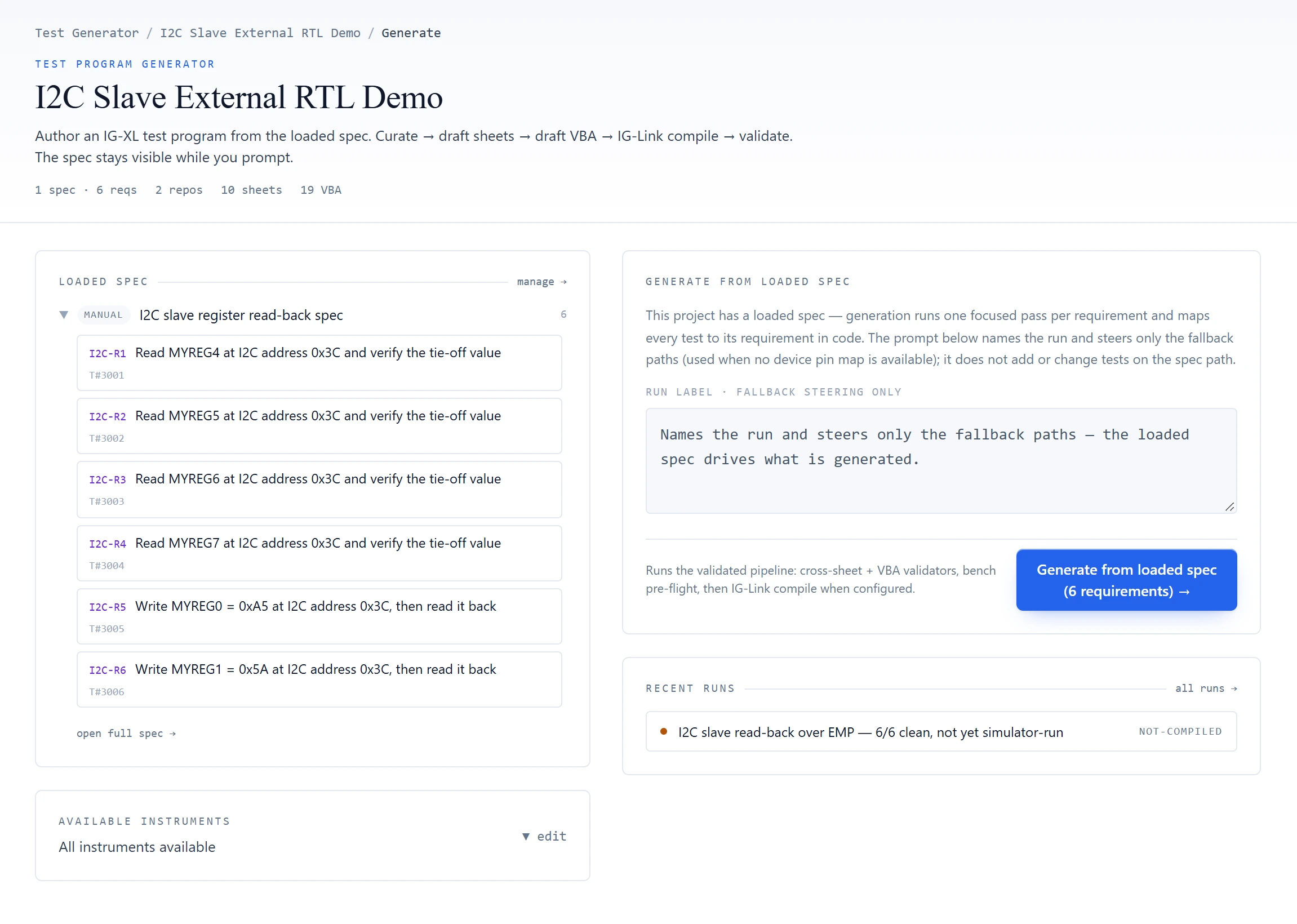
From spec to project
Bring-up starts from a complete IG-XL project already keyed to the spec, not from a blank workbook.
Each requirement from the ingested spec is sorted into a test family (DC current, DC voltage, DC parametric, serial functional, or serial then DC) and written for that family. Serial and digital tests get a real, deterministic pattern file and the code that runs it, never free-form vectors. For DC tests the model drafts the measurement code, grounded in built-in IG-XL and UltraFLEX platform knowledge; the test numbers, names, sheets and patterns around every test are written by code. Where a saved channel plan exists, its picks land in the program's channel map exactly as chosen.
- SpecRequirements with their test numbersingested from a datasheet or spec document, a requirements spreadsheet or a Jama Connect project
- GenerateOne focused pass per requirementpatterns, test numbers, names and sheets are written by code; the model drafts the DC measurement code
- CheckVBT API, tester pre-flight, sheet structure, limits against the speca program that fails pre-flight stops there, with its findings
- VerifyTests replayed against a model of the deviceby default a model derived from your register map, ready as soon as the map is loaded; what it cannot judge is listed, never passed
- Verify · RTLOptionalA model you connect judges insteadsuch as the RTL your design team already simulates, through a small adapter on your side that answers over ATE·IQ's own external-model protocol; the model stays with you and outranks the derived model (§04)
- RepairFindings go back to the model as targeted fixestwo rounds at most; what still fails arrives with its findings
- PresentA run page with every resultpipeline, validation, per-requirement report, waveforms and logs, and the project to download
- RunOptionalRun it on IG-XL's offline simulatorIG-XL loads and runs the finished program, and the datalog is reconciled test by test (§06)
Checked before you open it
The model drafts; the checkers decide. Every check result stays with the run, so a clean verdict can be audited and a failing one arrives with its evidence. Where pre-flight or the device model cannot judge something, it says so rather than passing it quietly.
Invented API members, caught
VBA that ATE·IQ writes, in a generated program or a chat answer, is checked against the VBT API. An instrument member or constant that does not exist is flagged before the code reaches the VB editor, along with documented settle times, prohibitions and electrical envelopes.
Pre-flight against the tester configuration
Every pin is checked against the pin map, channel types against the populated slots, PPMU force and clamp values against instrument ranges, and time-set periods against what the instrument can run. Every pattern, sheet and module must be registered. A program that fails pre-flight stops there, with its findings, instead of going on to IG-XL's compiler. Many of these checks began as failures that IG-XL's own tools reported.
Sheets that agree with each other
Flow, TestInst, Binning, Levels and the time sets are read together. The check flags test names and numbers that do not resolve, bins no test can reach, unused test instances, a missing pass or fail bin, a flow that does not start with continuity, and negative or suspicious Tdelays. On a program flagged automotive, it also flags a flow with no temperature-corner structure.
No looser than the spec
Right after generation, the program's limits are checked against the spec, with both sides in the same units. A program looser than the spec gets a named verdict on its run page. The core check is the one the traceability dashboard runs over production data.
Every run explains itself
The run page is the record: what ran, what judged it and what each requirement became.
The pipeline shows each stage as it completes. The device-model strip names the model that judged the program, with its digest and whether it passed its self-test. Below it, every requirement is listed with the test it produced, the instrument it uses and its findings. Validation, the device-model report, the waveforms and the logs are one tab away, and the whole project downloads in one click.
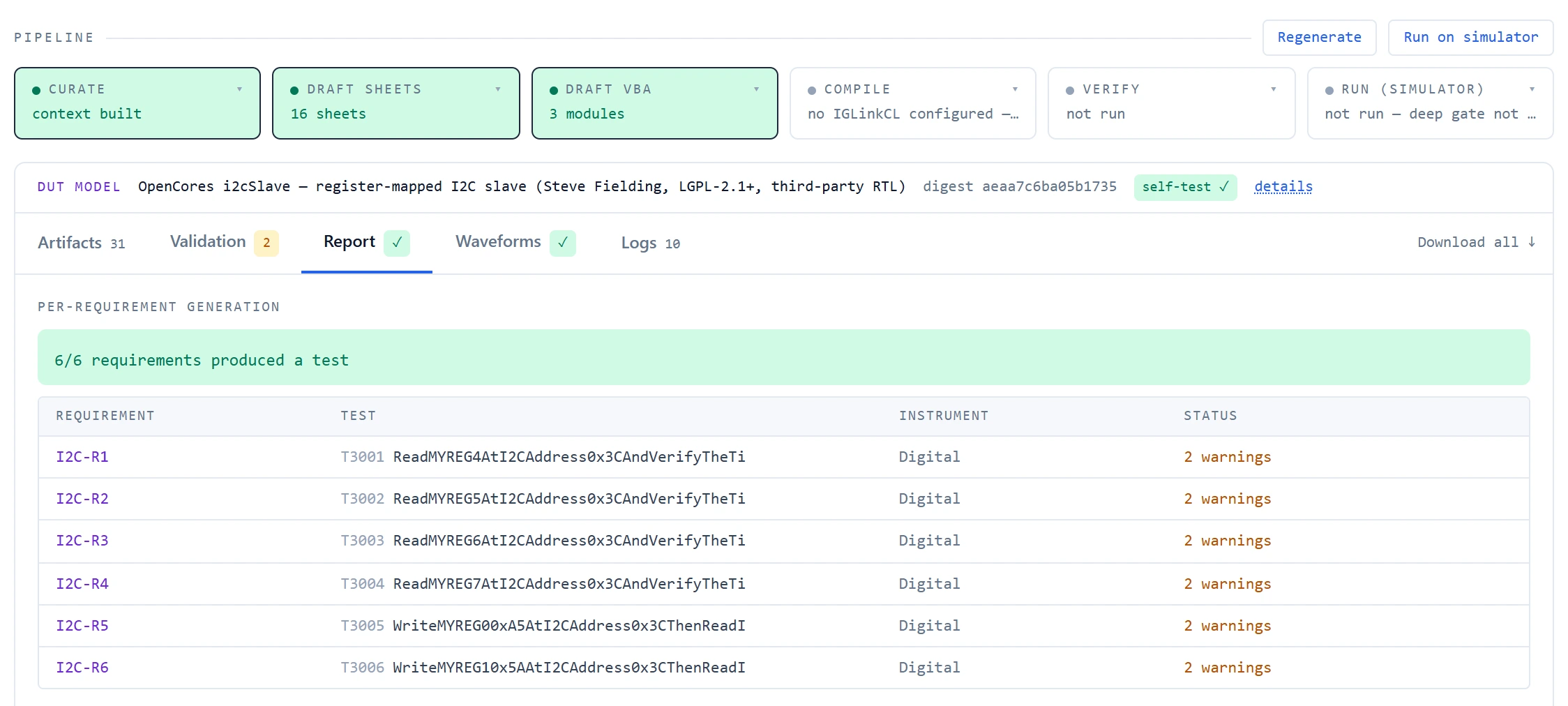
Optional: judge it against a model you connect
Connect a simulation model from your side, such as the RTL your design team already simulates, and it judges the replay: the program's tests are replayed against it before you open the program, and any test it cannot judge is listed as not verified, never passed.
An adapter on your side runs the model in your own simulator and answers ATE·IQ's questions over ATE·IQ's own external-model protocol; the model itself never leaves your hands. Before it judges, the model has to prove itself: a reset must bring back its starting state, identical questions must get identical answers, and it must pass its self-test — on the example below, register reads tied to lines in the RTL source. Then each pattern the program will drive is replayed against it. The model decodes the frames the way the part would, answers every read, and the program's compares are checked against its answers. The run records which model judged it, with its identity and digest, and keeps a transcript of every exchange in your project.
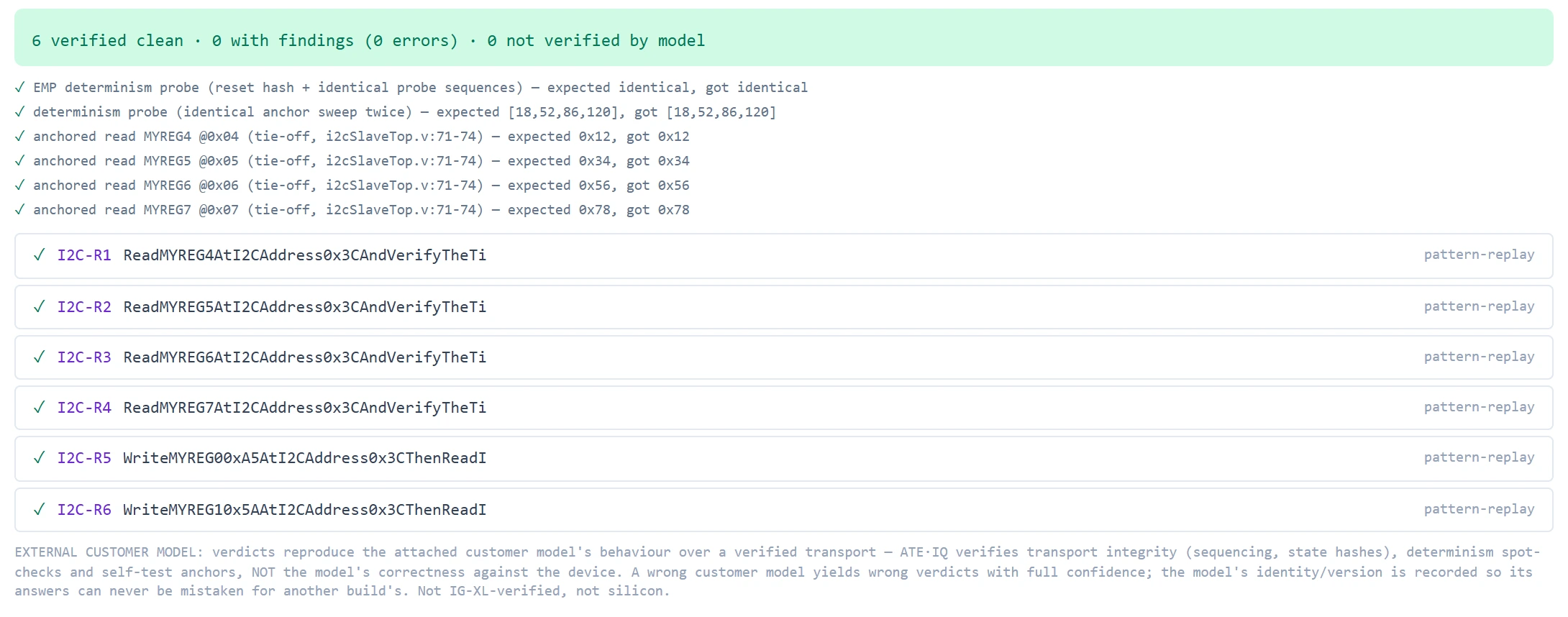
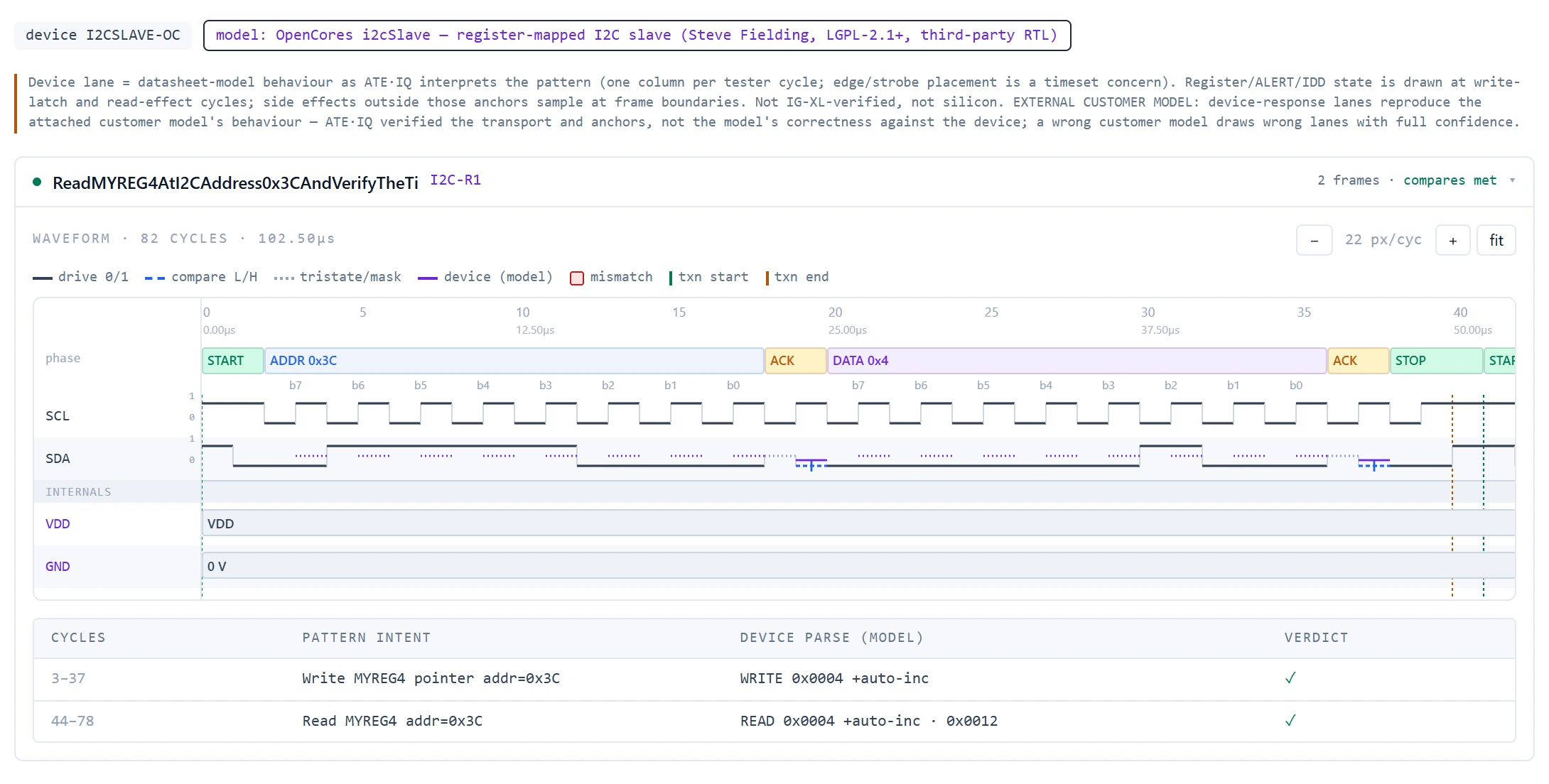
The step is optional, not a prerequisite. Without a connected model, the model derived from your register map judges the same replay. If a connected model cannot be reached, or refuses to prove itself, generation continues on the derived model and the run says so. IG-XL never runs your model: when the program runs on IG-XL's offline simulator, the simulator judges the model's predicted values baked into the program. The adapter kit, the protocol specification and the conformance script are on Device-Model Verification.
Example project: a six-requirement read-back spec for an open-source I²C slave core (third-party RTL under the LGPL), simulated in Icarus Verilog on a Linux virtual machine beside ATE·IQ.
Repaired within a fixed budget
When a check fails on the model's draft, its findings go back to the model as targeted instructions, one per defect, and the draft is revised. Findings on the assembled program and on the parts written by code are shown to you with their evidence. Repair stops after two rounds. A draft that still fails is shown with its findings attached; it is not polished further in the background. When the device model finds a measurement taken with the device in the wrong state, the repair may re-order the test. It may not delete the measurement, weaken it or widen its limits to make the finding go away.
Run it on IG-XL's offline simulator
Choose Run on simulator and IG-XL's own offline simulator loads and runs the finished program, so the program is judged by IG-XL rather than by the model that wrote it. The datalog is read back and reconciled test by test against the device model's prediction (agree, disagree or not run) on the run page. A program that compiles but cannot load a pattern, or runs and disagrees with the model, becomes a named finding before it reaches a tester.
It can use the IG-XL installation already on the engineer's workstation, or an IG-XL virtual machine.
On the demonstration project
The demonstration device is a small motion sensor with a 4-wire SPI interface, and its spec holds 16 requirements. They generated one IG-XL project of 10 sheets (Pinmap, ChanMap, DCSpecs, Levels, TestInst, Flow, Binning, References, TSB_Main and PatternSets), with limits on the Flow sheet's Use-Limit rows and one VBT module implementing all 16 tests: 12 drive a pattern file and 4 are DC-only. Cross-sheet validation reported 0 failures and 1 advisory warning (an unused bin), pre-flight was clean, and all 16 requirements are present on their test numbers (presence, not proof of a correct implementation).
A device model derived from the project's own register map and electrical pack passed its self-test, then replayed all 16 tests clean, including 80 compare cycles across the 12 pattern-carrying tests with 0 mismatches. On IG-XL's offline simulator the 16 tests produced 25 datalog rows, because multi-pin tests log one row per pin. All 25 executed, none failed, every test agreed with its prediction, and the program binned Bin 1 PASS.
Measured on the demonstration project, in an IG-XL virtual machine. IG-XL's offline simulator in a proof build: simulated instruments, one site, reads filled from the device model, every test forced to run.
Downstream, the traceability reconcile across the spec, the program and the production data (demonstration lots: seeded synthetic data with planted defects) named one compliance error. It was a guard band planted in the spec after the program was generated, which the program's Flow limit never picked up.
Refine it with the IG-XL agent
Load the generated project in IG-XL and carry on with the IG-XL agent beside it. Ask it to explain a test or change a limit: it stages the change, shows the before and after, and you apply it from the agent window beside Excel or from ATE·IQ Chat. Switch the pane to Debug and ask whether the program will compile: it runs ATE·IQ's offline pre-flight checks on the open program and tells you what only IG-XL itself can confirm. VBA it suggests in chat goes through the same VBT API check as generated code.
Measured, then ratcheted
Changes to generation are measured against a frozen set of test-program tasks before they ship. Each failure IG-XL's tools report is recorded together with the offline check that now catches it, and the build fails if that check disappears. A mistake the real toolchain finds once is caught offline from then on.