Assist
ATE·IQ Chat
A co-pilot that actually sees the project. Its context is curated per query — scored artefacts, not a dumped folder — and its answers can call real tools mid-conversation: tester knowledge, STDF statistics, board validation, the same compliance reconcile the dashboards run. What comes back is an answer with its sources attached.
Overview
Most code assistants answer from what happens to be in the window. ATE·IQ Chat answers from the project — the ingested spec, the workbook's sheets and VBA, the saved board designs, the parsed lots — and when a question needs a computation, it computes rather than recalls.
The division of labour is fixed. The model drafts prose and decides which tools to call; the tools are deterministic functions over the stored artefacts. A compliance verdict, a Cpk, a DRC finding or a pin lookup in a chat answer came from the same code path the corresponding dashboard runs — so the conversation and the dashboard cannot disagree.
Curated context
Before each query, a scoring engine ranks every project artefact against the question — workbook sheets, VBA modules, board designs, requirements — and only what scores makes it into the prompt. Recent artefacts get a decay boost; a board query boosts designs whose part names match. The context bar shows the chips that made the cut.
The same engine drives the Context Curator page, where the selection can be inspected, toggled item by item, and handed off to a chat session — so an engineer can see, and shape, exactly what the model receives before a single token leaves the machine. Conversation history is capped at 20 messages, so a long session cannot silently crowd the project context out of the window.
The tools
Called by the model mid-answer, executed in-process, rendered as cards in the conversation so the engineer sees what ran and what it returned.
| Tool group | What it does |
|---|---|
| IG-XL knowledge (9 tools) | Instrument rules and settle times, prohibition checks, VBT API lookup with the canonical TheHdw.X.Pins(Y).Z access path per entry, debug / best-practice / methodology / standard / device lookups, and local document search over the operator's own UltraFLEX Help installation (~17,000 pages, indexed and searched entirely on the operator's machine — never shipped with the product). |
| STDF | The full analytics suite from the STDF page — lot summaries, yield, parametric Cpk, cross-lot correlation, outlier screens — computed live from the parsed binaries. |
| PCB | Validate or analyze a saved design by name — the design loads server-side, so the model never has to echo a circuit into a tool call — plus parts search and detail lookups against the reference parts library, and validator-gated design edits that journal to revision history. |
| Spec compliance | The same deterministic reconcile the traceability dashboard runs: requirement coverage and limit comparison, with each disagreement attributed to the pillar that owns it. Chat and dashboard share one implementation. |
| Limit proposal | propose_limit_update — deterministic, zero LLM calls. Proposes program limits from lot statistics (mean ± 4σ, clipped to spec) and classifies each as tighten / widen / no-change / process-cannot-support / insufficient-data. A proposal only; it never writes a limit. |
How a query runs
- Score the project.
The curator ranks sheets, VBA modules, designs and requirements against the query and assembles only what scored — visible as chips in the context bar.
- Draft with tools available.
The model answers with the tool suite declared. A question it can answer from context, it answers; a question that needs a lookup or a computation triggers a call.
- Execute deterministically.
Each call dispatches in-process against the stored artefacts. No network hop, no second copy of the logic.
- Answer with the evidence.
Tool calls render as cards in the conversation; knowledge claims carry their citation and confidence tag. The engineer can see what ran, what it returned, and where a claim came from.
On the TMP126 demo
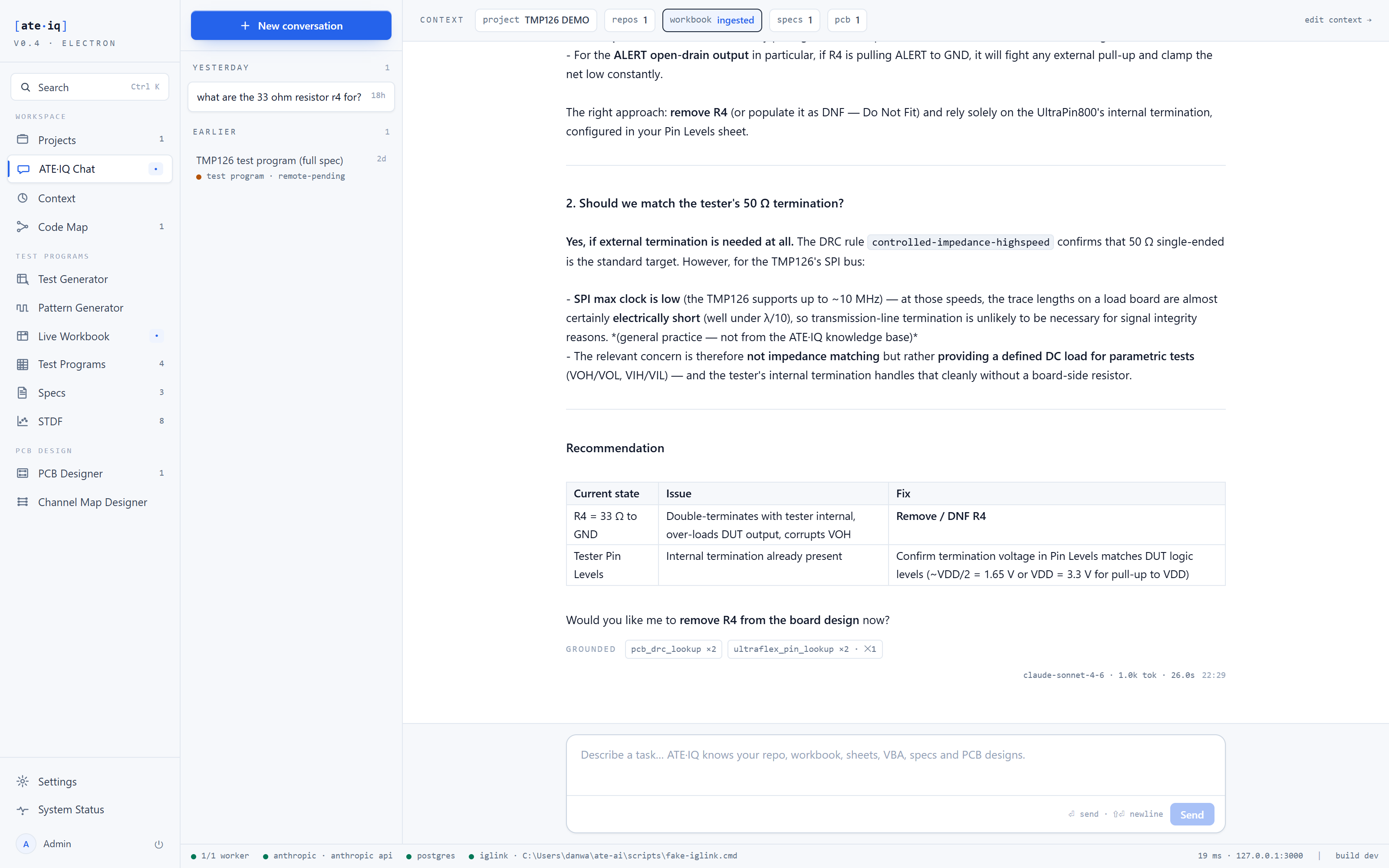
The exchange in Fig. 1 is the demo's board-review conversation. The engineer asks what the 33 Ω resistor R4 is doing. The assistant reasons from the design and the knowledge base: ALERT is an open-drain output, so R4 to ground would fight any external pull-up and clamp the net low; the tester side already presents a defined 50 Ω termination, configured in Pin Levels; and at the TMP126's SPI clock rates, transmission-line termination on a load board is unlikely to be needed for signal integrity. It cites the DRC rule it checked, tables the current state, the issue and the fix — Remove / DNF R4, confirm the Pin Levels termination voltage — and offers to apply the removal through the validator-gated edit tool.
Ask the same session to review spec compliance and it runs the identical reconcile the traceability dashboard renders: 34 of 34 requirements covered, one documented measurement-path compensation reported as informational, not as a violation.
documented, inferred,
partial or industry-standard. An inferred claim is
labelled inferred. Where the operator's local Help index is not installed, document
search reports itself unavailable instead of guessing.